
How to Fix the Worst Posture Mistakes
Your mother was right -- good posture is important! According to the American Chiropractic Association, good posture helps us stand, walk, sit and lie in positions that place the least strain on our muscles and ligaments. Poor posture can lead muscle strain and uneven muscle development and can make you more prone to injury and pain. But proper posture is more than just sitting up straight in your office chair. From how you walk and sleep to how you drive and carry bags, check out these common posture mistakes -- and how to fix them.
1. Texting
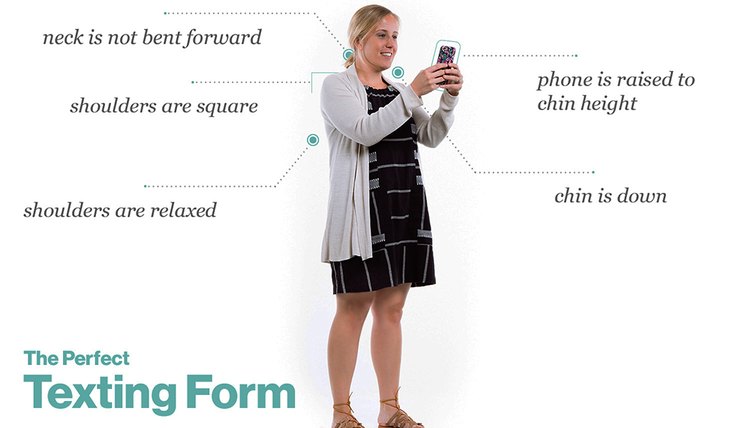
That Candy Crush victory comes at a cost: poor posture from staring down at your phone. According to the latest Nielson study, the average American spends more than 37 hours a month using phone apps, which equals a whole lot of time with your head hanging down, often at a 60-degree angle. “A study in the journal Surgical Technology International says the average adult head weighs between 10 to 20 pounds,” reports Dr. Dennis Enix, doctor of chiropractic and associate professor of research at Logan University in St. Louis. “However, the force of the headed titled down at a 60-degree angle puts 60 pounds of weight on the neck and shoulders.” Ouch. This can not only lead to a literal pain in the neck, but also to the risk of cervical tension headaches, neck sprains and herniated disks in your spine. The simple fix? Spend less time on your phone. Aside from that, Enix suggests modifying your texting position. “While texting, try to sit or stand upright with your shoulders square and the screen somewhat elevated so you are not looking down as much,” suggests Enix. “Being aware of your back, shoulders and neck will help remind you to avoid a hunched position while you are texting and avoid bad posture problems.”
Ethan Young
2. Sitting at a Desk
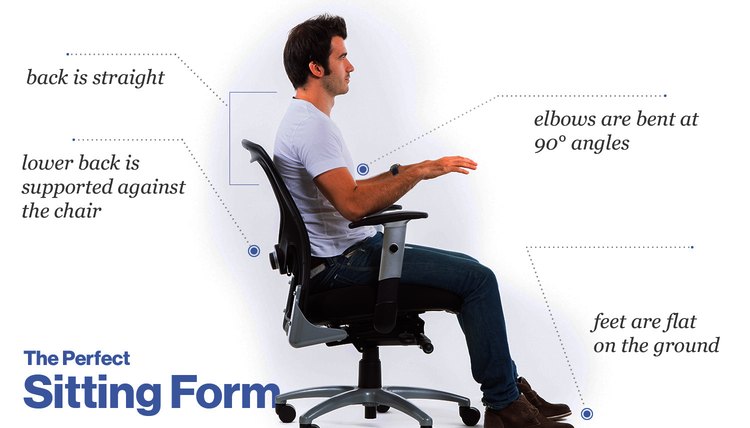
According to a recent Gallup poll, the average American workweek has increased from 40 hours to 47 hours. This means more time sitting at a desk hunched over a computer with your pelvis tilted and your head dropped forward towards the screen, says biomechanist Katy Bowman, founder and director of the Restorative Exercise Institute. All this sitting and hunching can lead to undue strain on your upper and lower back and neck. While many experts recommend a sitting posture with your back straight, lower back supported against the chair, elbows bent at a 90-degree angle to your body and feet flat on the floor, Bowman stresses that even sitting in this “ideal” position isn’t good for your body if it’s done for hours on end. “There is not a single ‘best’ posture to be still in the bulk of the day -- the problem is the all-day stillness. Strive to mix it up throughout the day by changing your work position,” suggests Bowman. She recommends improving your desk posture by adding such variety as sitting cross-legged in a chair, using a standing desk and taking walking breaks.
Ethan Young
3. Sleeping
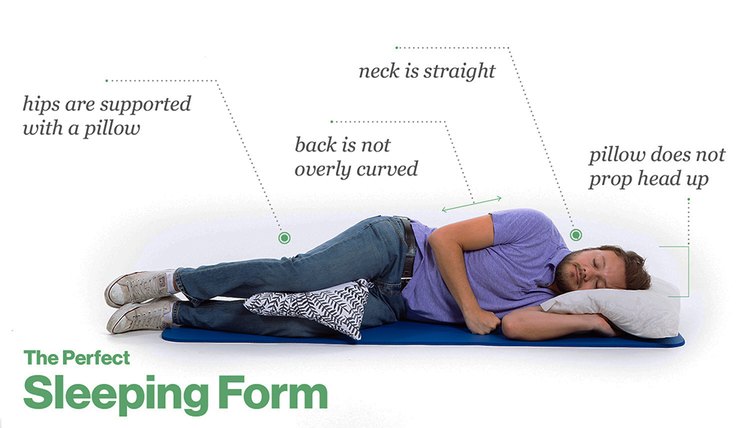
Though many of us aren’t getting the recommended eight hours a night, we still spend roughly a quarter of our lives in bed. All this time under the sheets can have a big impact on our spine health, says Dr. Todd Sinett, a NYC-based chiropractor and author of the upcoming book, “3 Weeks to a Better Back.” “We spend so much of our day curled forward and hunched over our computers and smartphones that our spines are bent forward in a curved C-like pattern. When we get into bed, we want to avoid continuing that C-like pattern.” So what’s the best posture-friendly sleep position? “My overall sentiment is that people should sleep however they are comfortable to ensure their body gets the most rest. But make sure you aren’t sleeping with more than one pillow,” suggests Sinett. “Being propped in bed while you are watching television, reading or sleeping is a recipe for neck and back pain.” Ryan Krane, M.S., CPT, PES, CES, who consulted on LIVESTRONG.COM’s photo shoot, also recommends using a pillow between your legs to support your hips.
Ethan Young
4. Walking
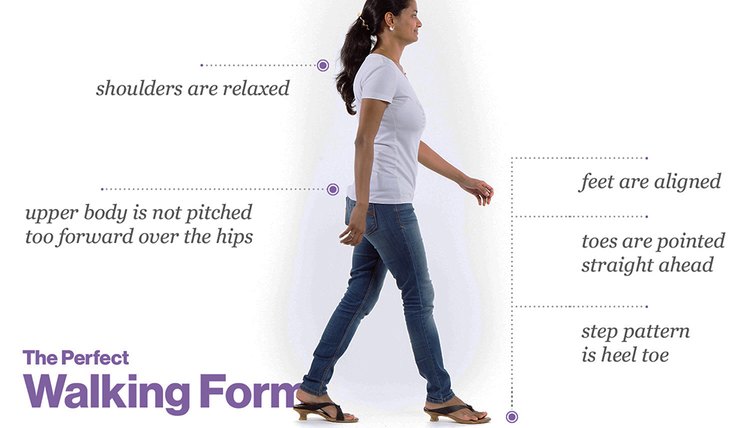
We know getting up and out of our desks is key for our health and longevity, but all walking is not created equal. “One of the biggest posture mistakes I see is that people walk with their feet turned out due to habit, muscle tightness or lack of joint mobility,” says podiatrist to the stars Dr. Emily Splichal, a human movement specialist and member of the Gait and Clinical Movement Analysis Society. “When we walk with our feet turned out, it alters the push-off phase of gait leading to an inefficient position of the foot and great toe joint.” Instead Splichal suggests, improve your walking posture by keeping your shoulders back, toes pointed straight ahead and maintaining a regular heel-toe pattern. “Remember that walking is supposed to be rhythmic and should have a rock from heel strike to toe push-off,” Splichal says. “With this rolling or rhythmic motion it is easier to ensure proper push-off in a straight foot position as opposed to turning out.” Certified corrective exercise specialist Ryan Krane of the Krane Training Method also pointed out that, perhaps in our rush to get somewhere fast, we tend pitch the upper body over our hips.
Ethan Young
5. Carrying a Bag
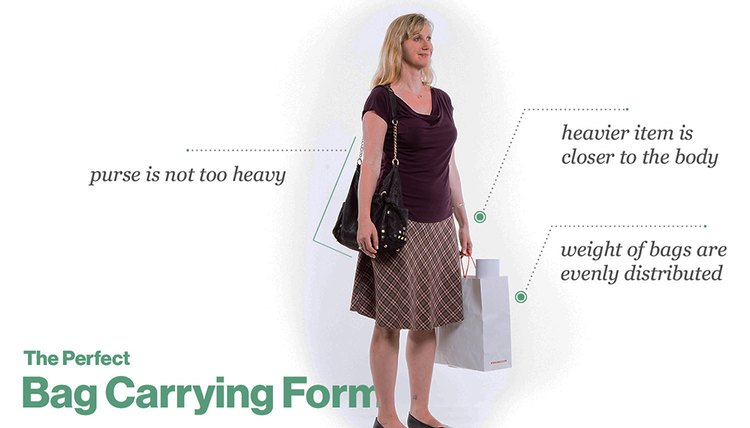
How heavy is the bag you carry around every day? Surveys on HuffingtonPost.com and BuzzFeed.com found the average woman’s bag weighed more than six pounds! All this is a recipe for poor posture, says New York physical therapist Karena Wu of ActiveCare Physical Therapy. “Take a look at an adult -- even without an added load, a lot of them still stand with that horrible posture. Now look at the types of heavy bags people carry around: shoulder bags, messenger bags and purses.” Each one can impact a person’s posture in a different way, so whether you carry a backpack, clutch or giant shoulder bag, Wu offers these three tips: (1) Pick a lightweight pack that doesn’t add any more weight to what you decide to carry around. (2) Place heavier items close to the body so that it does not add more “pull” away from the body. (3) Think about what you’re carrying. Krane, for instance, advised our model to distribute the weight evenly. “Be wise and choose what you need to carry around; anything extra is just added weight,” says Wu. The best bag for good posture? A rolling backpack, says Wu. “I will admit they are a bit more cumbersome. But if you do have any injuries, this truly is the best way to avoid further exacerbation.”
Ethan Young
6. Standing
Think healthy posture is as simple as just standing up straight? Think again, says Dr. Paul Salinas, doctor of chiropractic and certified chiropractic sports physician. “One of the many postural-correction mistakes I find patients practicing is just pulling their shoulders back and lifting their chin up. But good posture is not just an upper-body correction -- it’s a full body effort.” Start with breathing, says Salinas. “Breathing from your diaphragm instead of your chest will help engage your core and improve your posture.” Remember that there are different types of body alignment, so while one person may need to tilt their pelvis forward, another person may need to push their backside out. As a general rule of thumb, though, think about a plumb line being dropped above the center of your head, suggests Salinas. “That plumb line should intersect through your ears, through your shoulders, hips, knees, ankles. That’s your gravity line. Any time your body falls in front of that gravity line, you are putting stress on your body and your posture will be off -- and the rest of your body compensates to balance.”

Ethan Young
7. Driving
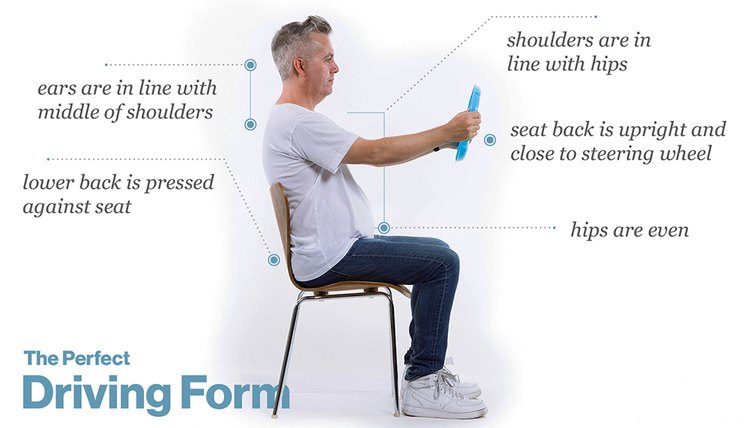
You might not think about posture while you drive, but with average U.S. commute times of 25.4 minutes one way (and 60 minutes or more for an unlucky 8 percent), how you sit in your car can play a big role in your daily posture. “Driving posture is one posture mistake that many people don’t think about,” says Dr. Taylor Moore, a Florida-based physical therapist and certified strength and conditioning specialist, who warns that your seat position and recline can leave your back in an unhealthy position. “If the seat is too far backward, the driver must rotate the hips to reach the pedal and brakes” which can lead to back pain or chronically short muscles on one leg and lengthened muscles on the other leg, says Moore. “Likewise, if the seat is reclined too far back, it places the back in a slouched, rounded position, placing stress on the posterior ligaments and muscles.” Instead, Moore suggests getting good driving posture with two simple fixes: (1) Check your seat recline: Your ears should be lined up over the middle of your shoulders and your shoulders located directly over your hips; (2) Check your seat position: Make sure your back is evenly pressed against the seat and your hips are even.
Ethan Young
Trivia: Which Posture Mistake Is This?
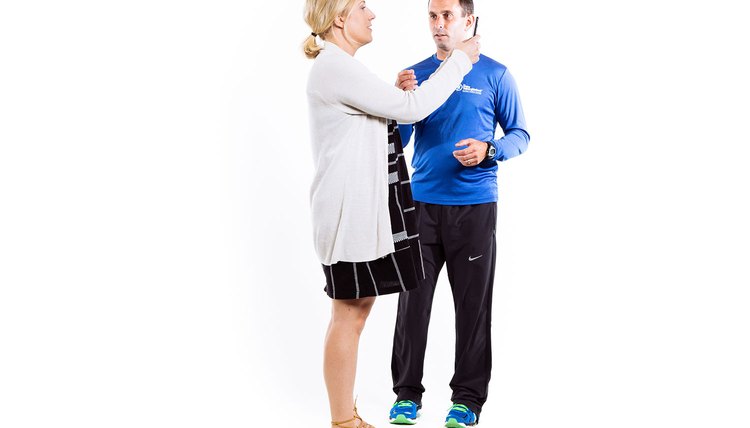
Which posture mistake is corrective exercise specialist Ryan Krane of RyanKrane.com correcting in this posture? Do you commit any of these seven posture sins? What are your tips for better posture?
Ethan Young
References
- Nielson.com
- Restorative Exercise
- ACA Today
- Brumagne S, Janssens L, Janssens E, Goddyn L. Altered postural control in anticipation of postural instability in persons with recurrent low back pain. Gait Posture. 2008;28(4):657-662. doi:10.1016/j.gaitpost.2008.04.015
- Jung J, Yu J, Kang H. Differences in trunk muscle activities and ratios between unstable supine and prone bridging exercises in individuals with low back pain. J Phys Therapy Sci. 2012;24(9):889-892. doi:10.1589/jpts.24.889
Writer Bio
Kate Bayless is an accomplished writer covering lifestyle, health, travel and parenting with bylines across the web at sites like Prevention, LivingHealthy, Babble and Momtrends as well as national glossies like Parents and Fit Pregnancy.